EX.NO:6
HOW TO USE A VISUALIZER:
Follow these instructions for connecting your laptop to an LCD projector.
HOW TO USE A VISUALIZER:
Follow these instructions for connecting your laptop to an LCD projector.
- Setup the projector facing the screen, and plug in the power cord. Set your laptop next to the projector.
- Plug one end of VGA cable (shown above) into the COMPUTER 1 IN port on the projector.
- Plug the other end of the VGA cable into your laptop's monitor port. If you have a display adapter for your laptop, connect that to the VGA cable before connecting it to your laptop.
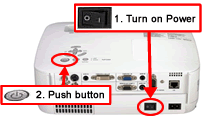 Turn on your laptop first. Then turn on the projector by first turning power button to | and then push the top power button.
The lamp will take a minute to warm up and display.
If there is a display problem, continue to step 5.- Switch your monitor (click on your laptop type below for details):
WINDOWS INSTRUCTIONS MACINTOSH INSTRUCTIONS
Comments
Post a Comment